This BlogSpot, I'll publish some IT related software, news or experience. Any comments or suggestions are accepted. Feel free to look around! ^^

Showing posts with label Blogs. Show all posts

04 April, 2008

How Addicted to Blogging Are You?

A fun website to test how addicted to blogging are you.
here: http://www.justsayhi.com/bb/blog_addiction

below are my answers and result:
Where is your blog located?
Blogspot, Blogger, or other hosted blog service. I have this blogspot, and my personal blog is in Windows Live Spaces.

How often do you update your blog?
Several times a week. I update this blogspot very occasionally now. But I do update my Windows Live Spaces almost on daily basis.

How many blogs (actual blogs, not individual blog entries) do you read a day?
12-20, depends on how many friends' and/or those tech blog I subscribed have updates on that day.

How much time do you spend reading blogs?
1-2 hours a day. My first thing to do when I got online is to check for every updated blogs, and I do that sevaral times a day. Not that I spend 1-2 hours straight on reading, but maybe around 10-20 minutes every time I went online.

How many different blogs do you post entries on?
2, as I said, here this blogspot, and my personal Windows Live Spaces.

Have you ever 'live blogged?' (where you blog about an event as it's happening)
Yes, I live-blogged using my mobile phone twice.

How do you stay up to date with all your favorite blogs?
I subscribe to feeds via RSS, Atom, etc

Have you ever blown off an important task, such as studying for an exam or making a deadline, because you were blogging?
Yes, sometimes.

If something interesting happens to you, do you immediately think about how you're going to write about it on your blog?
Sometimes. I'll take pictures and/or videos on the event, intended to blog about it when I got online.

What do you usually blog about?
Anything and everything, including personal issues or something funny you saw at the park the other day. I blog about techies thingy here, but I blog about anything and everything around me in my personal Windows Live Spaces.

What kind of blogging do you do?
Both professional and personal.

Have you ever tried to convince a friend or family member they should start a blog?
Yes, mostly friends.

Have you ever come up with a great blog idea while doing something completely random, such as taking a shower or watching a movie?
Yes. I got the idea to blog about mousetrap while I was doing my university project.

When this quiz is over, do you plan on blogging about your blogging addiction?
Yes, and I did.

And so I got...
84%How Addicted to Blogging Are You?


You can Try It Yourself!!

12 February, 2008

Web Page Analyzer

Ever wondered how your website runs on other people's computer? Is it fast? Is it slow? Is it too fancy, too much component? Or is it too boring, too few things?

Try here.


You can just ener your website url and submit, the results will then be shown.

Results for this page:

Ouch, this web has over 30kb in size...Every web should keep the size below 30kb if possible. I'll try to reduce the size in time...


For a T1 broadband will take about 8 seconds, so for DSL broadband should take about 10 seconds. Using my office DSL broadband really takes around 10 seconds to load this blog, not very fast, not very long...Everyone should keep the loading time as low as possible...


In the bottom of the analsis, there're some Advices for your webpage too...

02 February, 2008

Adding a Web Messenger into your website

What's a 'Web Messenger inside your blog'?
Look below. You may try it out when I'm online.
Don't spam me please.


If the above is too large, you may just wanna insert this small icon that shows your online status, follow with a link that redirects your visitor to a Web Messenger upon click-on.
Click to send an instant message to me

How do I do that? It's easy.
First, you must have a Windows Live ID.
Second, you must have an instant messenger client that can sign you in with your Windows Live ID.
Sign up a Windows Live ID
More information on Windows Live messenger

Visit here.
Sign-in with yout Windows Live ID, on the left, click on the [Create HTML] tab. Next, choose your style, size, and color you desire. Copy the code below and paste into your space/blog/website/whatever.

Easy?

More information on Windows Live messenger

28 January, 2008

Multiply


Multiply...A blog, a network, an online storage etc.
General speaking, it is a social network service like Friendster, but it offers MORE than just social network services. It offers UNLIMITED online storage for media!!!

You can use Multiply to find friends online. You can choose to view you friend's Multiply page, your friend's friend's profile...up to 5 Tiers of network!


1-Tier: Yourself


2-Tier: Your friend


3-Tier: Your friend's friend


4-Tier: Your friend's friend's friend


5-Tier: Your friend's friend's friend's friend

You can store your medias online. They have UNLIMITED storage for you to store/share files there.


Don't worry if you already have a blog elsewhere, you can use the import function of Multiply to import every articles from your previous blog.
You can import blogs from Blogger, yahoo360, TypePad, Windows Live Spaces, LiveJournal, xanga.com, amazon.com wishlists.

Photos too, no worries.
You can import your photos from Windows Live Spaces, KodakEasyShare Gallery, Photobucket, Shutterfly, flickr etc.

For videos, you can import videos from YouTube, Photobucket, Google Video, metacafe, and myspacetv.com.

Because everyone've been sharing their things, you may find some useful or interesting things in there. To find a specific media, you can search from there. Search for Blogs, photos, videos, reviews etc...
*They've disabled music search recently due to some piracy issue.

The only downside of Multiply is...everything inside is only limited to members only. Non-members cannot share, search, and download anything from there.

So, what're you waitin for!? Sign up, and start sharing away~~~

My Multiply Site


External Links:
www.multiply.com
The Multiply Blog
Multiply from wikipedia

17 January, 2008

How do RSS works, and how to use it?

For your information, RSS stands for 'Really Simple Syndication'

I'll not explain any deeper. For more details, you can look it up on wikipedia or you Google it.

Let's jump to the main question. How do RSS works?

Before the RSS even born, people used to check updates of a website, or blog, or whatever by visiting the website frequently. This, is very time consuming if you have about 30 friends' blog and 3 forum or news site to check...

Now, with RSS, you can save A LOT of your precious time. After you subscribed with the website you wanna keep track of, you'll be notified when the website is being updated. So all you need is to check out the updated site instead of every single one of 'em.
Watch a simple video explanation of RSS from YouTube

So, the most important thing here is, how to use it?
It's easy. All you need is a RSS reader. It could be your browser, it could be an external software, or a web-based reader, depends on your need.

How to use rss on IE7? (browser)
How to use rss on Firefox? (browser)
How to use rss on Mozilla Thunderbird? (e-mail client)
How to use rss on Google Reader? (web-based reader)

How to use rss on Internet Explorer 7?
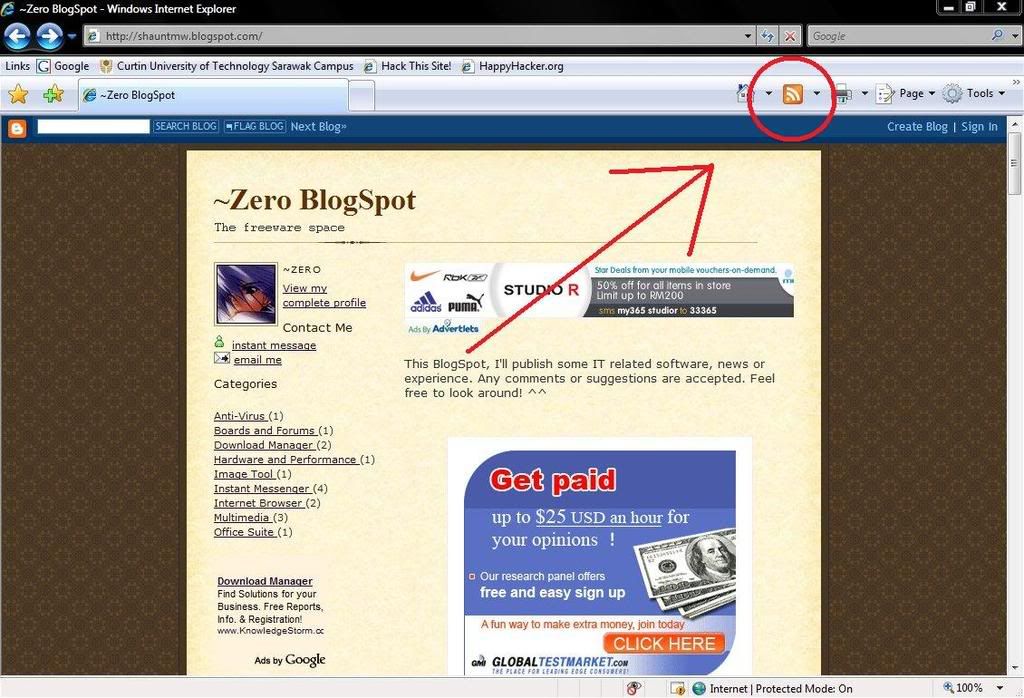
Go to whatever website you wanna subscribe to, and click on the rss icon on your toolbar. (If it's dark and unclickable, that means the website you're looking at isn't supported with rss feed)

click to enlarge


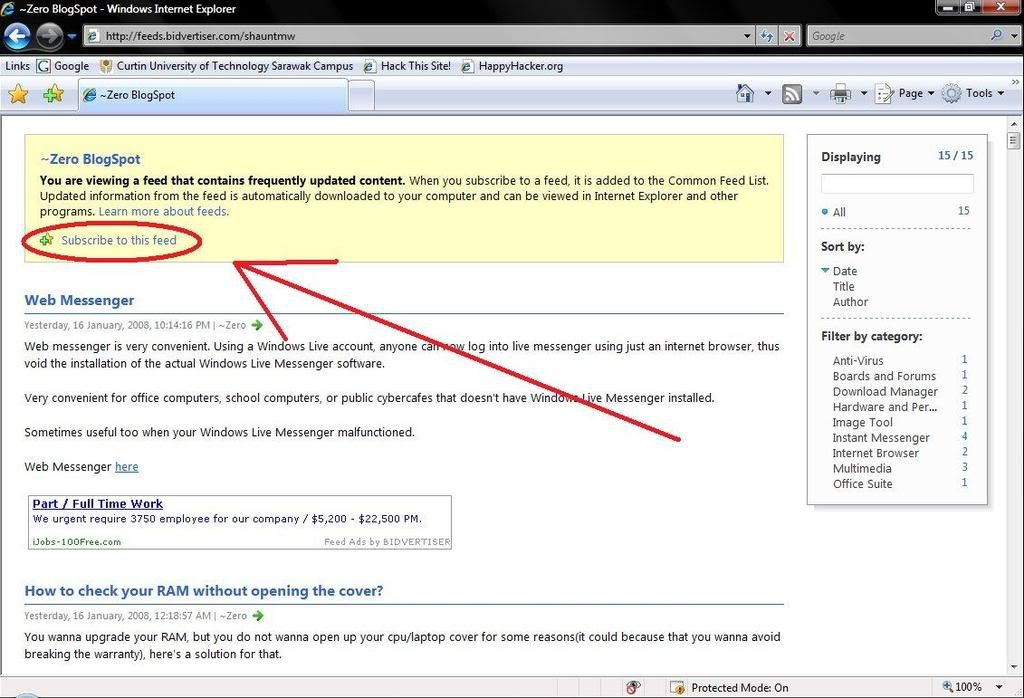
A page like this will most likely appear. Just click on the 'Subscribe to this feed' to subscribe.
click to enlarge


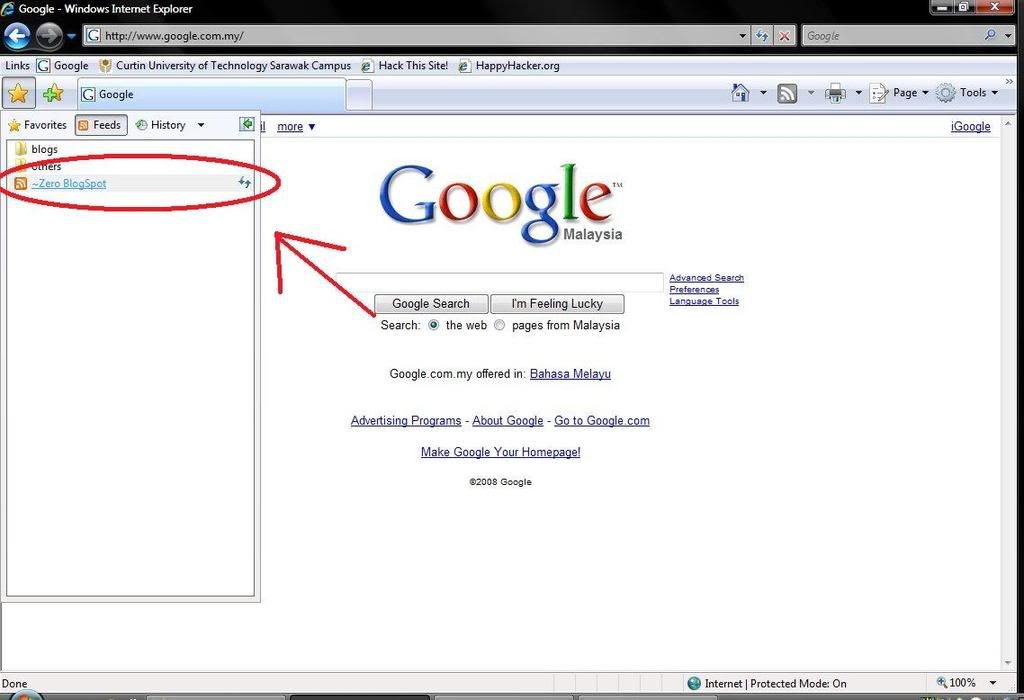
You'll then be promted to save in which location. After saving, you can find the feed under the feed tab.
click to enlarge

Viola~ done! So go on and subscribe to all your friends' blog and new sites as you want!
back to top

How to use rss on Mozilla Firefox 2?
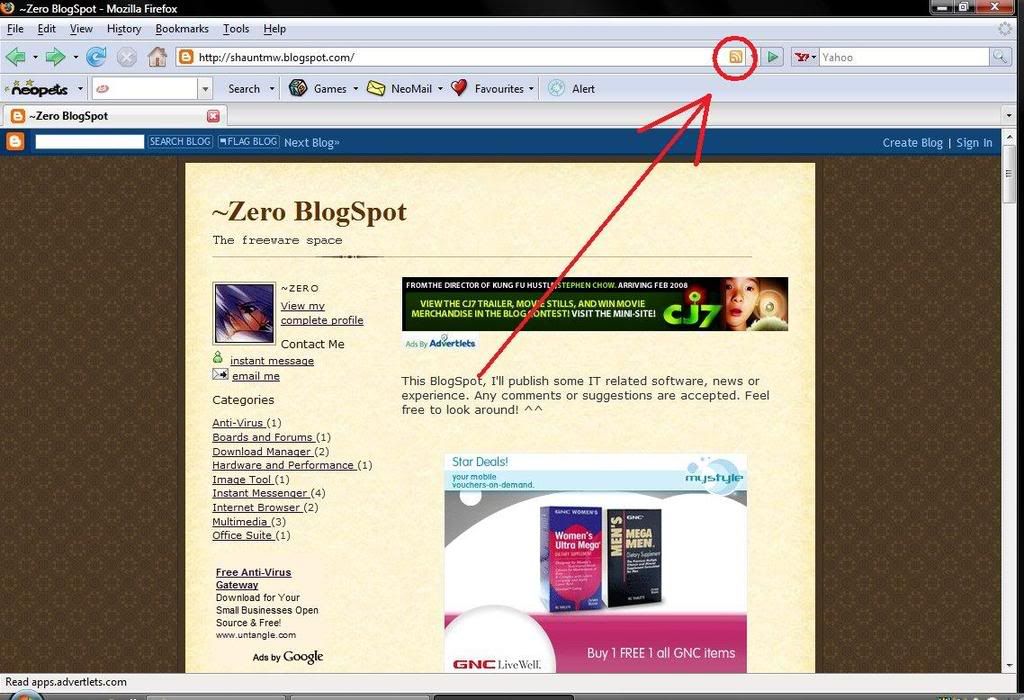
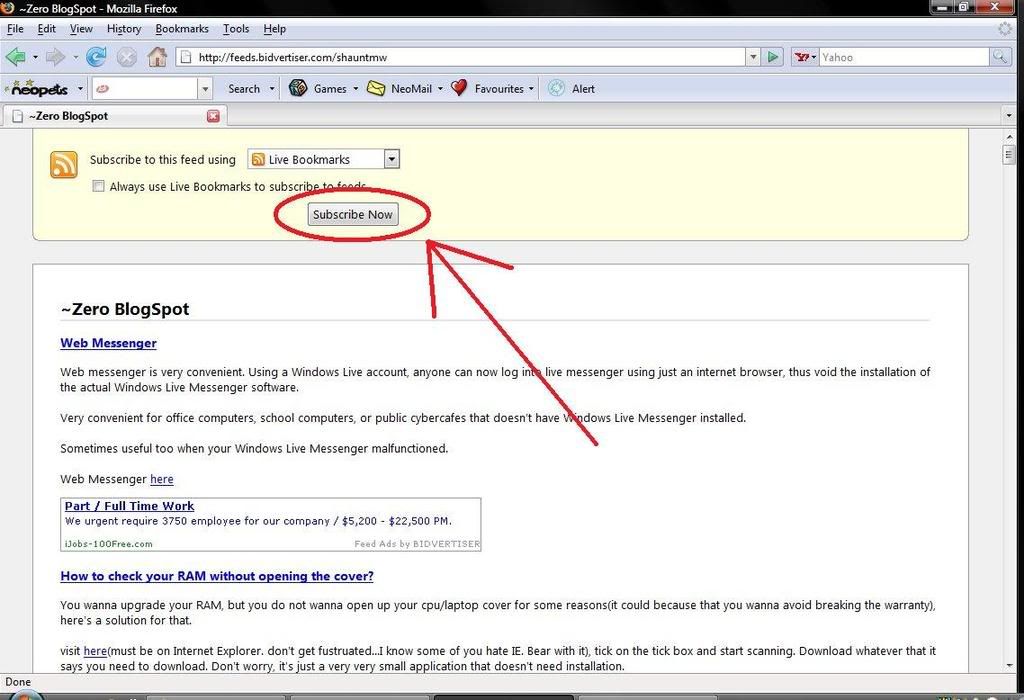
Go to whatever website you wanna subscribe to, and click on the rss icon on the address bar. (If there're nothing, that means the website you're looking at isn't supported with rss feed)
click to enlarge

A page like this will most likely appear. Just click on the 'Subscribe now' button to subscribe.
click to enlarge

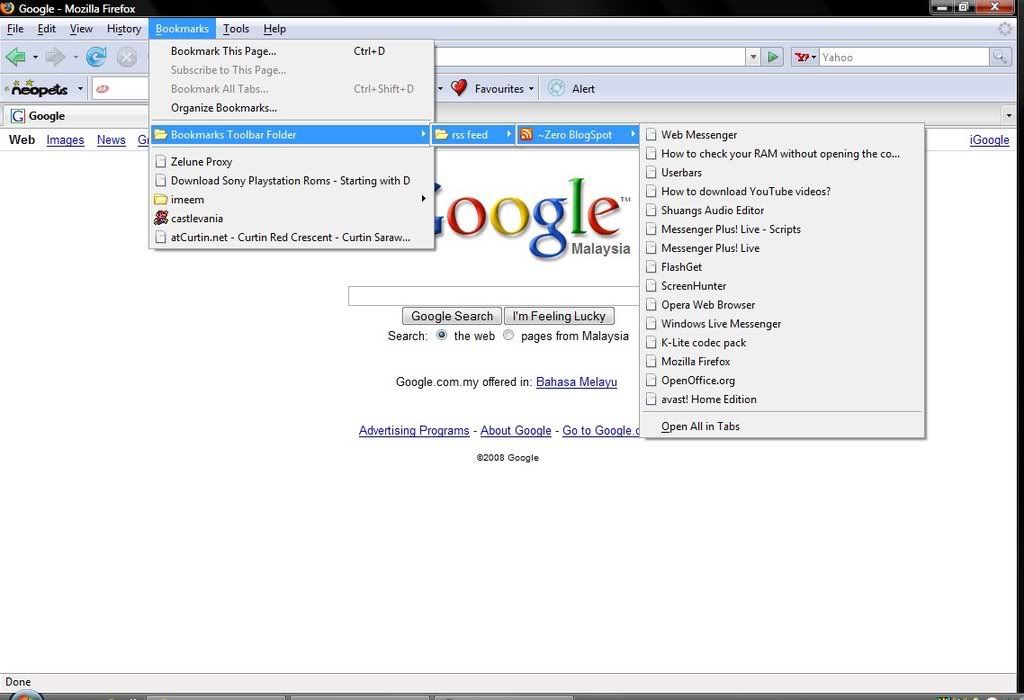
You'll then be promted to save in which location. After saving, you can find the feed under the bookmark menubar.
click to enlarge

Viola~ done! So go on and subscribe to all your friends' blog and new sites as you want!
back to top

How to use rss on Mozilla Thunderbird 2?
Download and install Thunderbird
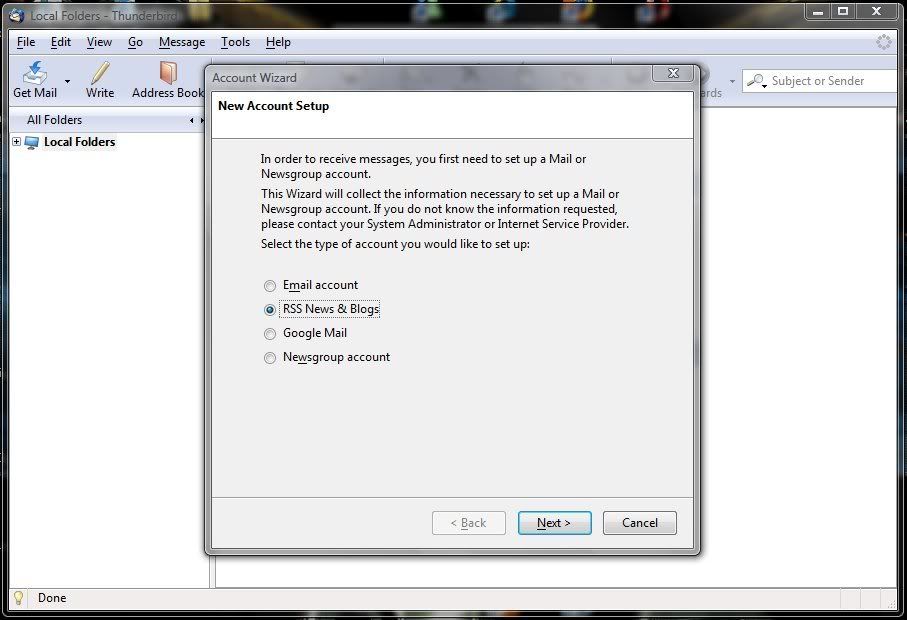
Create an account of 'RSS News & Blogs'. Next, Type in an account name.
click to enlarge

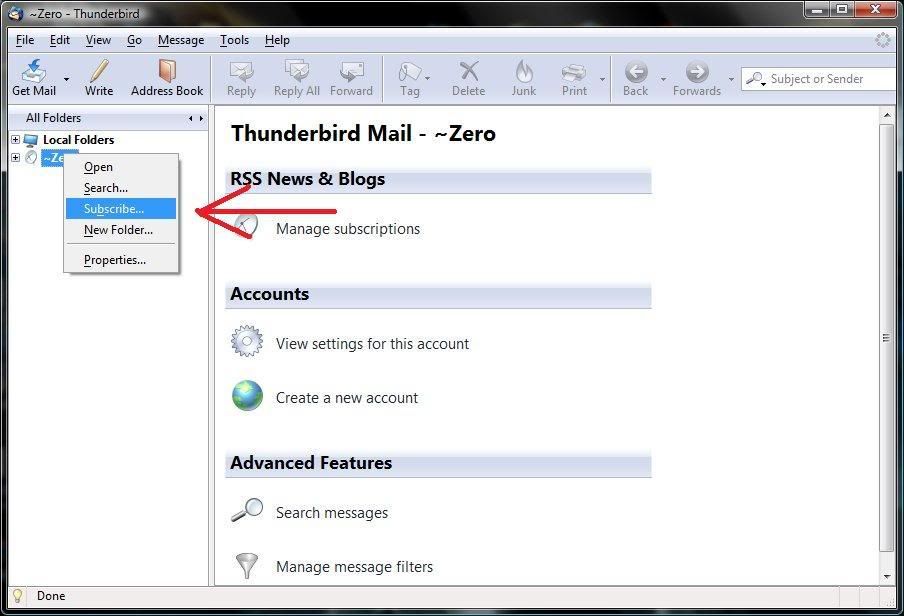
Right click on your account and choose 'subscribe'
click to enlarge

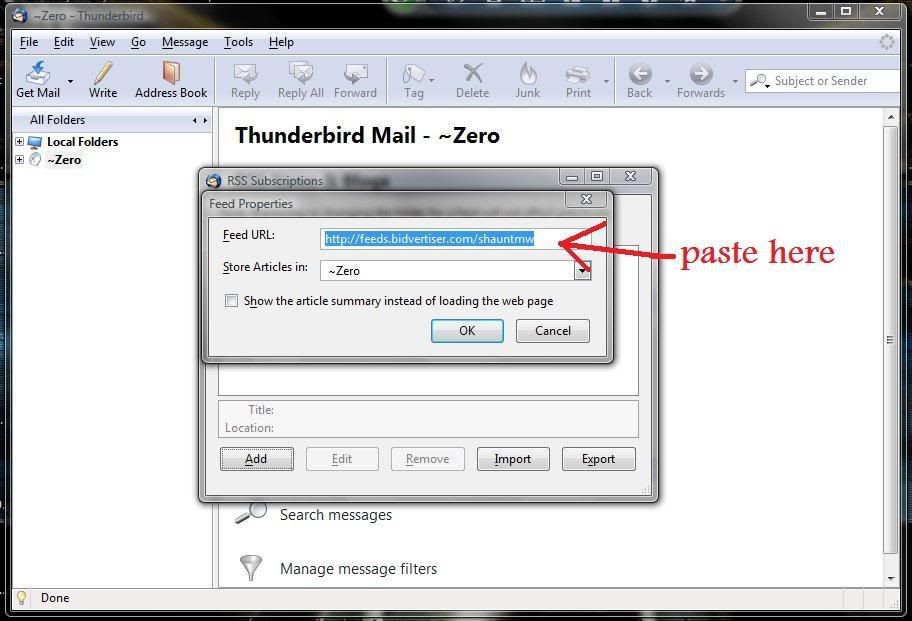
Click the 'add' button, copy and paste the feed url into the box. The feed url can be found by clicking the rss button on websites, usually on the sidebar or the bottom of the site.
Some common rss button:
click to enlarge

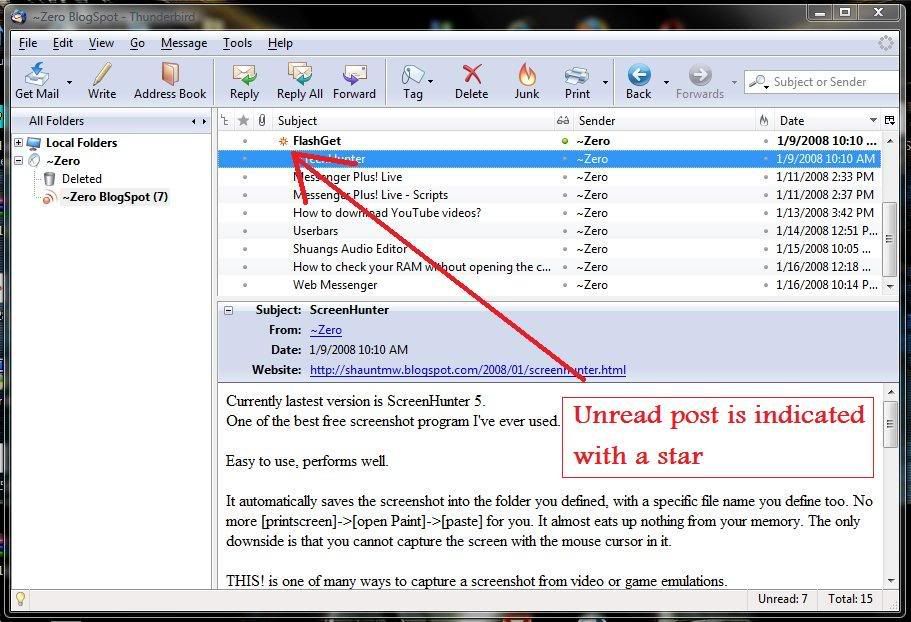
And finally, it will act as a rss reader for you. Unread posts are indicated with a star beside.
click to enlarge

Viola~ done! So go on and subscribe to all your friends' blog and new sites as you want!
back to top

How to use rss on Google Reader?
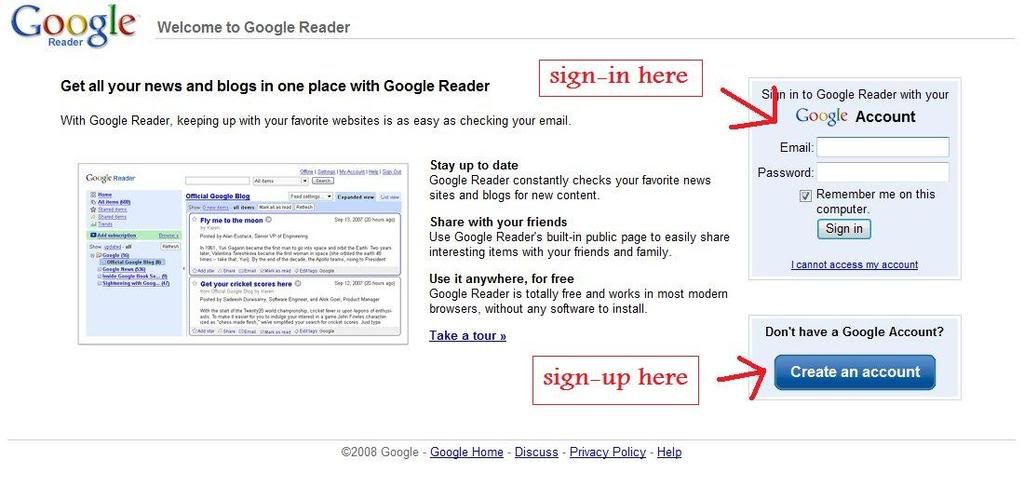
Visit the Google Reader website at http://reader.google.com.
If you have a Google account, sign-in.
If you don't, sign-up one.
clic to enlarge

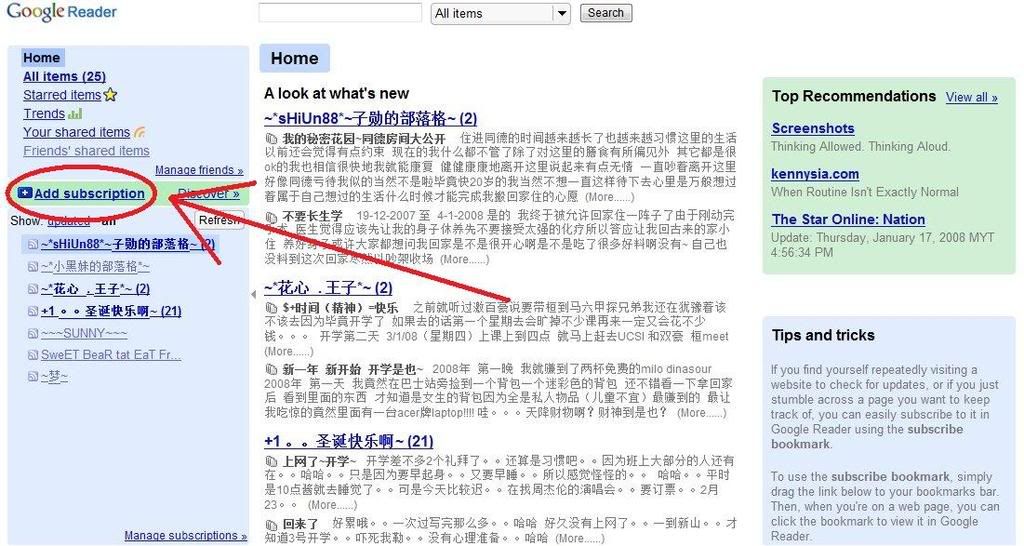
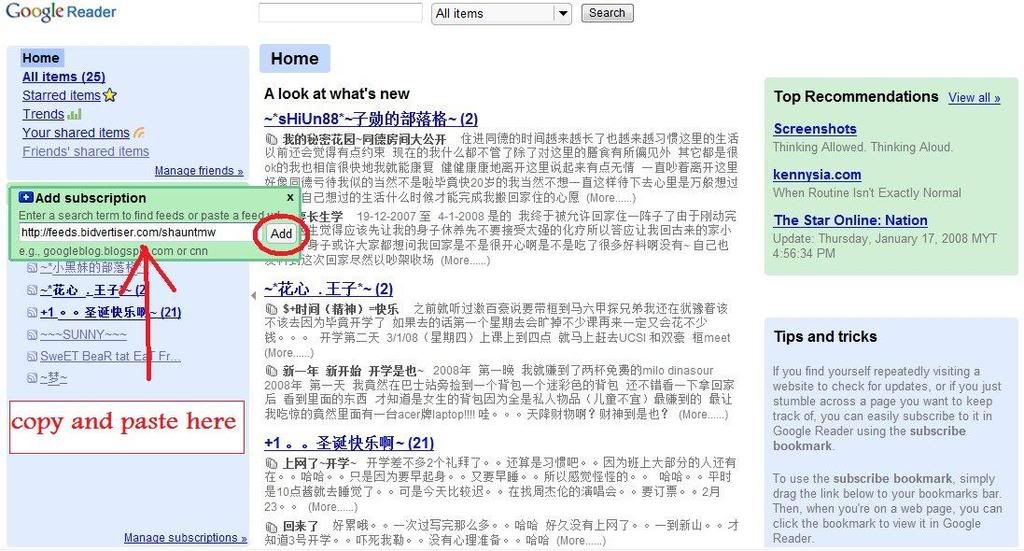
Once you sign-in/sign-up, you'll be redirected into your feed reader. To add a subsciption, click on the 'add subscription'
click to enlarge

Copy and paste the feed url into the box and click 'add'. The feed url can be found by clicking the rss button on websites, usually on the sidebar or the bottom of the site.
Some common rss button:
click to enlarge

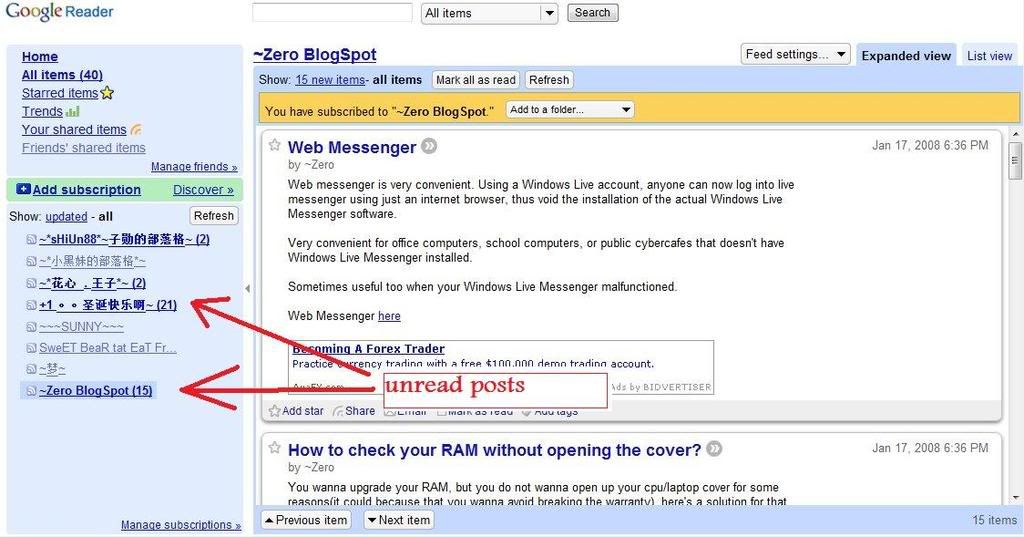
Finally, the unread posts will be bolded.
click to enlarge

Viola~ done! So go on and subscribe to all your friends' blog and new sites as you want!
back to top

External Links:
RSS from wikipedia
A list of RSS readers from wikipedia
Search for RSS using Google

More information on Firefox