This BlogSpot, I'll publish some IT related software, news or experience. Any comments or suggestions are accepted. Feel free to look around! ^^

Showing posts with label Multimedia. Show all posts

03 February, 2008

How to record sounds played from your computer?

Method ONE:
Close the door, turn off the fan, and make sure no sounds other sound is nearby. On the speaker to maximum volume, put a microphone near the speaker, and start recording...

Results: BAD!!

Method TWO:
Get a recording device that comes with an input port. Buy a cable, and connects the computer output to the device's input. Start recording...

Results: WORSE!!

WHY SO MUCH EFFORD?
Here's a better way. No external device required. Records exactly the same quality as how the audio is played by the computer.

Method THREE: (The right one)
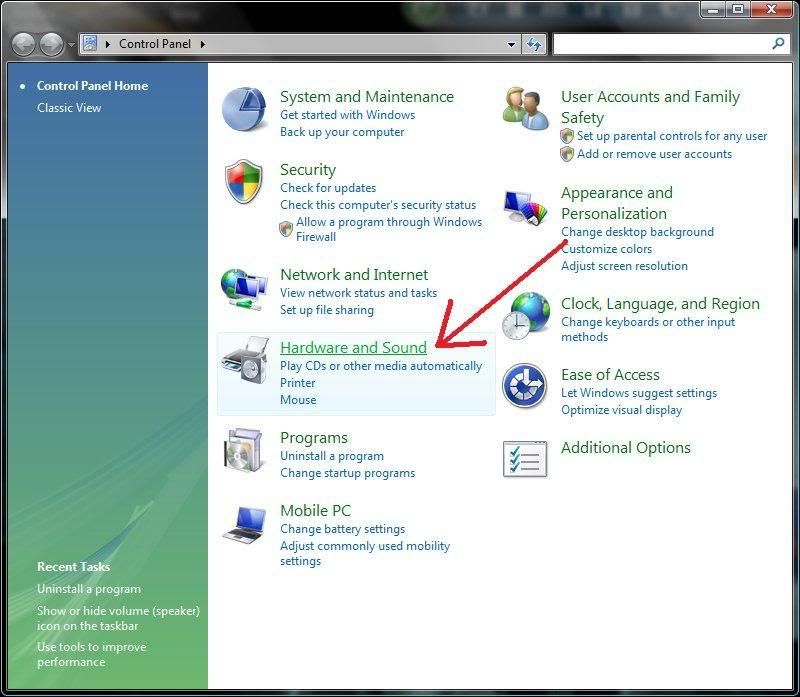
First, you have to enable the Stereo Mix from the Windows Control Panel.
Start > Control Panel > Hardware and Sound
click to enlarge

Click on Sound Control
click to enlarge

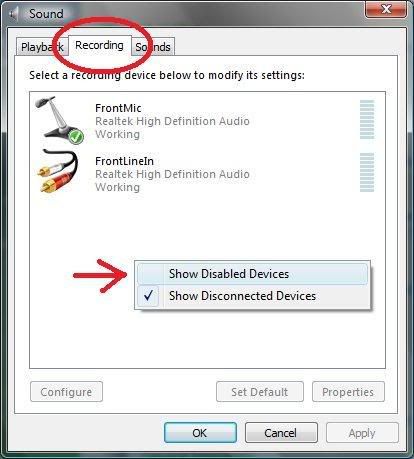
In the Recording tab, right click on the blank space and select [Show Disabled Devices] to call out the Stereo Mix. (Windows XP won't need to do this, as the Stereo Mix is already there)
click to enlarge

OK, now right click on the Stereo Mix and enable it.
click to enlarge


Now, you can record any sound played from your computer with any recording software like Audacity.

Results: GREAT!! Cheers~

More information on Audacity

31 January, 2008

Real Alternative - The alternative for RealPlayer

Since my last update of Real Player, and the installation of some games that needs the Real Arcade or some sort, it really screwed my Real Player out. So, I decided to remove all Real components, and use this Real Alternative instead.

Real Alternative is a codec pack that lets you play Real Media such as .rm and .rmvb without using the Real Player. For more information about codecs, visit this post.

With this Real Alternative and the K-Lite codec pack, you can now play almost every media format you can ever name them(*really).

Download Links:
Download from CodecGuide.com
Download from FreeCodecs.com

External Links:
Real Alternative from wikipedia
Search for Real Alternative from Google

More information on K-Lite codec pack

29 January, 2008

Audacity - The Free, Cross-platform Audio Editor


Audacity is a free, cross-platform audio editor, that enables you to...as mentioned...edit audio files.

You can choose to record your audio files, or you can import a WAV, MP3, or whatever supported audio files, edit the audio, and export it into popular audio format like WAV or MP3.

Like a movie maker, you can combine, split, and add effects for the output audio.

click to enlarge


Good tool for recording, adjusting existing audio, and remixing.
Have fun! ^^

Download Links:


Note: To import/export MP3 audio format, you will need to download and install the LAME MP3 encoder. Visit this page after you've install Audacity for instructions on how to install LAME MP3 encoder.

External Links:
Audacity homepage
Audacity from wikipedia

28 January, 2008

Multiply


Multiply...A blog, a network, an online storage etc.
General speaking, it is a social network service like Friendster, but it offers MORE than just social network services. It offers UNLIMITED online storage for media!!!

You can use Multiply to find friends online. You can choose to view you friend's Multiply page, your friend's friend's profile...up to 5 Tiers of network!


1-Tier: Yourself


2-Tier: Your friend


3-Tier: Your friend's friend


4-Tier: Your friend's friend's friend


5-Tier: Your friend's friend's friend's friend

You can store your medias online. They have UNLIMITED storage for you to store/share files there.


Don't worry if you already have a blog elsewhere, you can use the import function of Multiply to import every articles from your previous blog.
You can import blogs from Blogger, yahoo360, TypePad, Windows Live Spaces, LiveJournal, xanga.com, amazon.com wishlists.

Photos too, no worries.
You can import your photos from Windows Live Spaces, KodakEasyShare Gallery, Photobucket, Shutterfly, flickr etc.

For videos, you can import videos from YouTube, Photobucket, Google Video, metacafe, and myspacetv.com.

Because everyone've been sharing their things, you may find some useful or interesting things in there. To find a specific media, you can search from there. Search for Blogs, photos, videos, reviews etc...
*They've disabled music search recently due to some piracy issue.

The only downside of Multiply is...everything inside is only limited to members only. Non-members cannot share, search, and download anything from there.

So, what're you waitin for!? Sign up, and start sharing away~~~

My Multiply Site


External Links:
www.multiply.com
The Multiply Blog
Multiply from wikipedia

13 January, 2008

How to download YouTube videos?

Method 1:
Use an online converter and download the converted video directly.
Try this: http://vixy.net

Method 2:
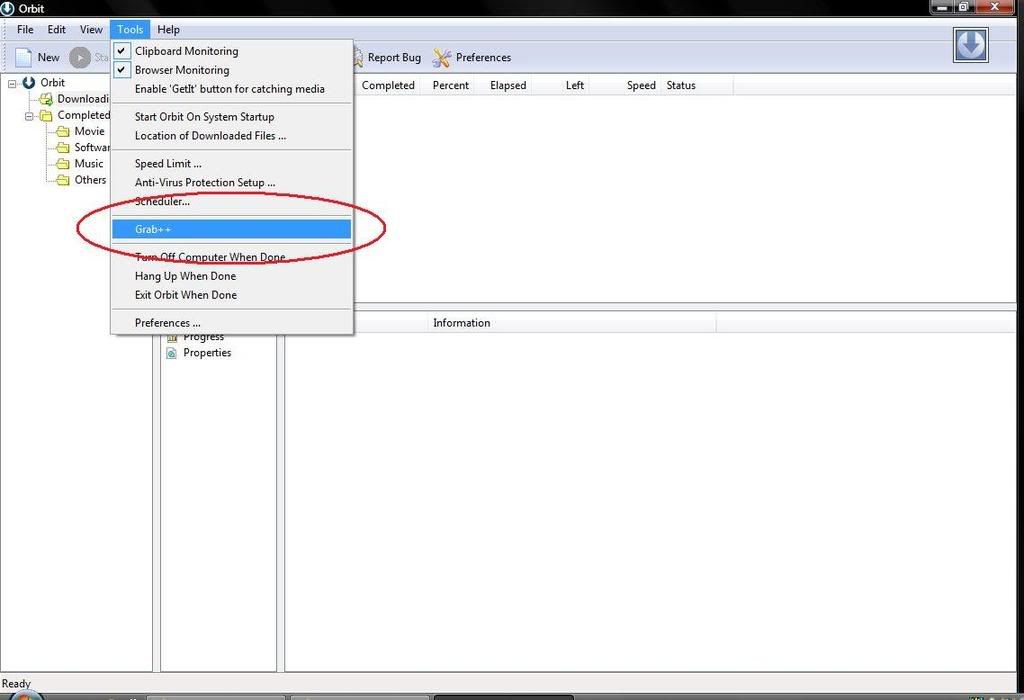
Use Orbit Downloader's Grab++ tool and grab the video file from YouTube.
Download Orbit Downloader from here:


Step by Step tutorial on how to use Grab++
1) Open up the Orbit Downloader

2) Open up Grab++
tools > Grab++

click to enlarge


3) Open up the webpage where your video is
(If it's open, refresh the page)

4) Find the video file from the Grab++ and download
click to enlarge


Last, play it on your computer!

Note: For both methods, you may need a right codec to be able to play it on your media player. Either you get a suitable codec(K-Lite codec pack works), or you get a video converter to convert the videos into formats that is compatible with your current media player.

External Links:
Orbit Downloader official website
Orbit Downloader from wikipedia
Orbit Downloader from CNET Download.com

More information on K-Lite codec pack

11 January, 2008

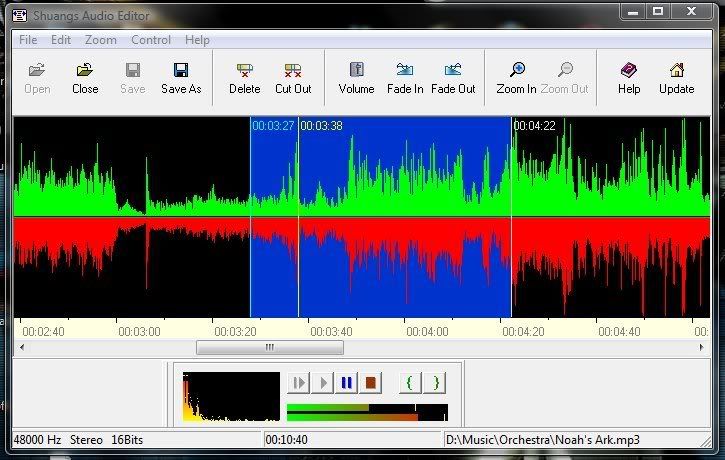
Shuangs Audio Editor

click to enlarge

Nice and simple tool for editing audio files.

You can easily split wav, mp3 and wma files accurately.
A very nice and simple tool, especially good for cutting songs into ringtones.

A lot of bad reviews out there though...
Can't guarantee anything, use at your own risk.
For myself, I haven't met any issue though.

Download Link:

05 January, 2008

K-Lite codec pack

Normally, Windows user will have Windows Media Player preinstalled.
You can use that media player to listen to musics, watch videos, etc.

One day, you got a sound clip or a video clip, that come with a strange format, that your windows media player cannot play! So what to do?
You search the net, and find several websites which offers media player that specifically plays that kind of file format. eg: real player for rm, quick time for mp4 etc.

Actually, instead of having so many different media players installed in your computer, you could've just install a codec pack, that gives your media player the power to play any different format!

Let me explain what's a codec in a simple and understandable way.
Codec means Coder-Decoder (there're several other definitions too). Every media files are coded in different ways, and your media player needs a decoder in order to play that certain media file. Understand?

Ok, another more simple way.
Imagine, that the windows media player is a mini-combo that can play audio cd, vcd, casette. Usually, you only plays CD(mp3), sometimes casette(wma), and watches VCD(wmv). One day, you bought a DVD(mp4), and your media player cannot play! So what to do? You go and buy another DVD player(quick time player) just to play that kind of dvd. After that, you got a MD from a friend(rmvb), so you go and buy a MD player(real player)...etc.

So, how to codec works?
Installing a codec, is just like installing the DVD and MD function into your media player. K-Lite codec pack included almost all codecs of media formats you could see anywhere.

Now, you can play just anything with your windows media player.
Have fun! ^^

Good:
- Enables you to play almost every media formats using Windows Media Player.
- Gives you another media player in case your Windows Media Player malfunctioned.
Bad:
- Only available for Windows OS.

Download from
www.codecguide.com
www.free-codec.com
A list of K-Lite codec pack components - here

External Link:
K-Lite codec pack from wikipedia