


How to make my Firefox load page faster?
How to make my Firefox downloads faster?
- by installing a Download Manager into Firefox
- by intergrating my Download Manager into Firefox
How to make my Firefox safer?
- by installing an extension that blocks all internet scripts
- by clearing all private data stored in Firefox everytime I close it
How to make my Firefox load page faster?
First, install Fasterfox add-on into your Firefox. Fasterfox is a Firefox extension that speed-up page loading time. Once you installed Fasterfox, restart your Firefox for it to be working.
Install here
Go to Tools -> Add-ons, click on the Fasterfox options. Preset should be Turbo Charged, so leave it as it be. Go to Fasterfox tab, tick on the top checkbox, which should Enable Enhanced Prefetching.
What is Enhanced Prefetching?
How to make my Firefox downloads faster?
- by installing a Download Manager into Firefox
Install DownThemAll! add-on into your Firefox. DownThemAll! is a Download Manager extension for Firefox. It can pause and start downloads at anytime you wishes, without losing any data. Once you finished installing, restart your Firefox for it to be working.
Install here
- by intergrating my Download Manager into Firefox
If you have a Download Manager such as FlashGet, Orbit Downloader, BitComet etc. This FlashGot extension will come invery handy for you. Instead of copying the file url and paste them into your Download Manager, you can FlashGot them. Everytime you download a file, Firefox will prompt you which way you wants your file to be downloaded, either directly using Firefox, or with your Download Manager.
Install here
Once you finished installing, restart Firefox for it to be working.
If you have more than one Download Manager, you may want to choose which default Download Manager you want to use for normal downloads. To choose/change, go to Tools -> Add-ons, Options for FlashGot extension, and choose your Download Manager in the combobox.
How to make my Firefox safer?
- by installing an extension that blocks all internet scripts
Most malicious software, trojan worms, viruses etc. are triggered to install itself into your computer using javascripts or java in the website. IF you disable ALL javascript and java in EVERY website, you can say, almost have zero risk while surfing the net(just surf, no downloading). However, your internet activity would be greatly limited, since you can only view normal web pages. Besides, without javascript, you cannot sign in or log into any website. With this NoScript extension, it's like a filter for javascript and java for you. You can choose to eliminate all javascript in unknown website, only allow trusted website to use javascript. This may greatly reduce the risk of getting hacked, depends on your internet usage.
Install here
Once you finished installing, you must restart your Firefox for it to be working.
- by clearing all private data stored in Firefox everytime I close it
This is easy, and doesn't need to install anything. By clearing all private data stored in Firefox cache everytime you close it, you will clear all temporary files, cookies etc. Especially cookies, it stores your log in information, which mostly information of your username and password to whatever website you signed-in. If you're using public computer, clearing all internet temporary file is HIGHLY advised.
To clear all private data everytime you close Firefox, just go to Tools -> Options, under the Privacy tab, tick on [Always clear my private data when I close Firefox]. And that's it.
External Links:
Fasterfox Official Website
DownThemAll Official Website
FlashGot Official Website
NoScript Official Website
wikipedia: Fasterfox, DownThemAll, FlashGot, NoScript
Google: Fasterfox, DownThemAll, FlashGot, NoScript
More information on Firefox
More information on FlashGet
More information on Orbit Downloader
26 January, 2008
Firefox add-ons: For a faster and safer firefox


13 January, 2008
How to download YouTube videos?
Method 1:
Use an online converter and download the converted video directly.
Try this: http://vixy.net
Method 2:
Use Orbit Downloader's Grab++ tool and grab the video file from YouTube.
Download Orbit Downloader from here:
Step by Step tutorial on how to use Grab++
1) Open up the Orbit Downloader
2) Open up Grab++
tools > Grab++

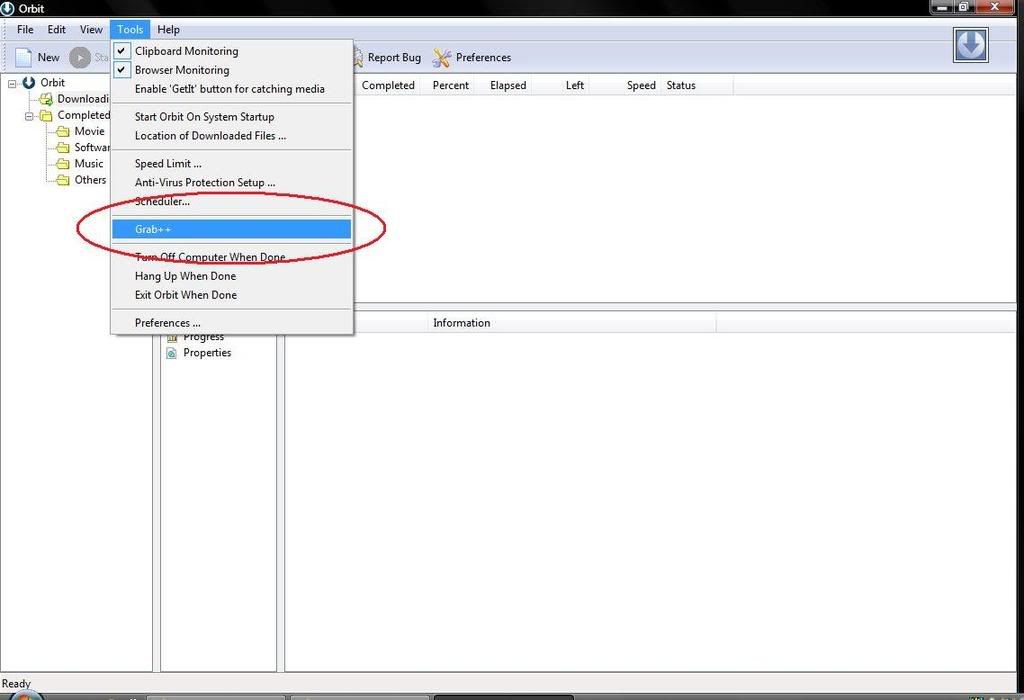
3) Open up the webpage where your video is
(If it's open, refresh the page)
4) Find the video file from the Grab++ and download

Last, play it on your computer!
Note: For both methods, you may need a right codec to be able to play it on your media player. Either you get a suitable codec(K-Lite codec pack works), or you get a video converter to convert the videos into formats that is compatible with your current media player.
External Links:
Orbit Downloader official website
Orbit Downloader from wikipedia
Orbit Downloader from CNET Download.com
More information on K-Lite codec pack
08 January, 2008
FlashGet
One of the best download managers.
Normal download, you have to wait for the whole download to complete. If something happens, disconnected or whatever, you will have to download from zero again. (depends)
With a download manager, like FlashGet, it has the feature to stop, pause, and continue last download at any time. Besides, FlashGet splits the downloading files into many parts, and download it with many jets at a time.
You could download anything up to 10 times faster then a normal browser download if you use a good download manager like this. Highly recommended for any users.
New versions even have the feature to open torrent files and start your BT networking.

A screenshot of FlashGet while downloading.
Download links:


External Links:
Official Website
FlashGet from wikipedia